Sickness, tiredness, being overly busy and the nights drawing in have made things difficult to keep up with over the past couple of weeks, so the Smart Hub sat awaiting its unboxing for a while. However, yesterday was the day!
 Unwrapping the main packaging revealed a chunky folding out box that contained the “smart things”. It’s certainly nice packaging, which adds to the general idea of entering the slick, automated future with a tri-fold box that unwraps to reveal not only the items, but a sleek purple finish within, that proclaims the brand “smart things”. Very much on message, so far!
 Upon removing the hub, a message peers through from underneath, with a friendly “hello!”. Pulling the packaging out gives access to the small instruction manuals which actually contain very little information and are more of a reference for identifying each thing plus a load of warnings and bumf in several languages. The main instruction is to take out the smart hub and plug it in, then download the free app and follow the instructions. So far so good – everything is nice and simple and phrased in a friendly way.
 I downloaded the app and set up the hub. Everything went well, the screen was nice and friendly, although the blue branding was a bit of a departure from the purple encountered so far.
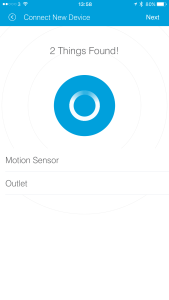 And that was where things started to go a little wrong. I was supposed to pull out the tabs that blocked the batteries and wait for the hub to discover my items. It started well, soon proclaiming that it had found two items. However, then it stopped. At least, it stopped finding them. It never stopped trying. After twenty minutes of my phone’s battery being drained for no reward I quit the app.
And somehow, despite all attempts to be a very friendly interface, the app became rather difficult to navigate. I’m good with technology. I’ve worked with websites and apps for as long as they’ve been available to home users. I test them for a living. But no matter what I tried, by the end of Sunday I had managed only to poke around the app and get it to turn on and off a lamp I plugged into the outlet socket.
After work today I tried again. One of the items it does recognise is the motion sensor. Our proper landing light is broken (long story, quite dull, but we have a lamp as a substitute) so until this weekend we had a lamp plugged into a remote controlled socket that requires you to press the number associated with that particular socket. This seemed like an ideal chance to come up with a better solution. I linked the motion sensor and mounted it downstairs – only temporarily with sticky pads as I’m in no mood for drilling and plate mounting at this stage. I then went looking for how to make it trigger.
This could certainly be better labelled. It took me a while to recognise that triggers are associated with “routines”. I expected a routine to involve doing things at a set time of day, not when a sensor is alerted to something happening. As such I kept avoiding that screen and looking for what I wanted and ending up going round in circles. Eventually I got there, though.
And so I set up a trigger to switch on the landing light when there’s movement downstairs during the hours of darkness. It’s pretty cool! I switched off the light, pleased with this progress.
Then I went hunting for how to trigger it turning off and found that it was a similar story. So I set one of those up. As far as I can tell I have told it “automatically peform ‘turn light off’ when things quiet down” with “things quiet down” being defined as when the motion sensor senses no motion for 3 minutes.
It doesn’t work. I can make the light come on as expected, but it never decides it’s been quiet for 3 minutes. I know the sensor is not detecting extra activity I’ve not accounted for because if I perform the switch off manually then it doesn’t come back on by itself until I approach the sensor. This is a little frustrating. I shall persevere. I will probably delete that trigger and set it up again later.
Poking around the interface has let me appear to set up the presence sensor, although I’m not sure if that’s a false positive. It doesn’t want to know about the door sensor, it might as well be a lump of plastic. I shall try some more experimentation tomorrow.